
Business Intelligence covers collecting, preparing, presenting, analyzing, and ultimately using data. The result is insights and solid decision-making foundations—to make more objective and measurably better decisions.
BI includes the strategies, methods, and tools used in this process to turn raw data into valuable insights—and to strengthen competitiveness.
A BI system can combine sales, marketing, finance, and administrative data to visualize it in a shared interface. Executives, managers, and teams can spot trends—such as rising sales in one region—or bottlenecks in the supply chain at a glance and act accordingly.
The following article provides a comprehensive beginner guide to business intelligence and making data usable. It covers relevance, benefits, and concrete starting points.
Contents
Key takeaways
- Self-service BI makes business intelligence accessible and usable without technical prior knowledge.
- BI leads to faster, lower-risk decisions with sustainably better results.
- The BI cycle enables continuous, proactive identification of bottlenecks, opportunities, and trends.
What is Business Intelligence?
The goal of business intelligence is always to gain clarity and decision-making foundations based on data.
Depending on needs, resources, and data availability, different business intelligence solutions can make sense.
Large companies often have the need and the resources to collect, prepare, and store their own (and many) data sources. That creates opportunities, but also a lot of work.
Self-service business intelligence solutions, on the other hand, make it possible to take these tasks off your hands quickly—so anyone can create professional dashboards in just a few clicks, without prior knowledge.
In general, business intelligence does not only include the finished dashboards and reports, but also the processes behind them. That’s why the next section provides an overview of key terms from data management.
Building blocks, types, and typical setups
Especially with modern self-service BI tools, the work around these components can be reduced almost to zero—so anyone can use the benefits of business intelligence without prior knowledge and without many resources. These are the typical business intelligence building blocks:
Data sources: internal systems (e.g., ERP, CRM, shop, accounting, Excel) and external sources (e.g., website analytics, ad platforms, market data).
Data integration and preparation: data gets connected, cleaned, standardized, and transformed. This is often automated via connectors and pipelines (commonly called ETL/ELT).
Central data base: a central place where structured data is stored, e.g. a data warehouse or a data lake. The goal is a shared, consistent foundation of numbers.
Data model and metric logic: raw data is organized so it can be analyzed meaningfully. This includes clear definitions of metrics (e.g., “revenue”, “gross margin”, “active customers”) and the logic behind them—so everyone means the same thing.
Analysis and visualization: dashboards, reports, and ad-hoc analyses make data understandable and filterable. Good visualization helps spot patterns, outliers, and trends quickly.
Delivery and use: information must reach the right people at the right time—e.g., via interactive dashboards, scheduled reports, or alerts on thresholds.
Governance and operations: permissions and roles, documentation, data quality, refresh cycles, and monitoring are crucial for long-term reliability. For European companies, GDPR is a key requirement.
BI questions can also be grouped into four types—depending on which decision they support:
- Descriptive: What happened? (reporting, monitoring)
- Diagnostic: Why did it happen? (root cause analysis, segmentation, drill-down)
- Predictive: What will likely happen? (forecasts, trend analyses)
- Prescriptive: What should we do? (recommendations, rules, scenarios)
In practice, there are different ways to implement these building blocks. Three typical setups are:
1) In-house / “toolbox setup” (combining separate components)
Here, individual building blocks are assembled separately—for example, a tool for data integration, a central database (data warehouse), and a visualization/reporting tool. This offers a lot of control, but also requires more planning, maintenance, and technical know-how.
- Pros: very flexible, scalable, full control over data model and storage, good for complex requirements
- Cons: high initial effort, ongoing operational and maintenance work, responsibilities for data quality, updates, and monitoring must be defined
2) Integrated BI tools / “all-in-one approach” (one solution covers multiple building blocks)
Here, a BI solution takes over many steps in one system: connecting data, preparing, modeling, and making it usable in dashboards/reports. This is often quick to set up and reduces technical effort. Depending on the provider, there can be limitations for very specific data models, integrations, or export/automation requirements.
- Pros: fast start, fewer technical hurdles, often includes templates and self-service features, quick results
- Cons: less flexibility for modeling and custom logic depending on setup, potential limits for highly individual requirements, possible tool lock-in
3) Hybrid (combining central data base and BI tool)
Many companies combine both: e.g. a (cloud) data warehouse as the central data base and a BI tool as the frontend for analysis and dashboards. A step-by-step approach is also common: start quickly, later move parts out or add components.
- Pros: balance between speed and control, often easy to extend
- Cons: more integration and coordination effort than “everything in one tool”
Which setup is best depends on resources, complexity, data ownership requirements, and the desired speed. The next section shows how BI typically works in practice—independent of the setup.
How does Business Intelligence work in practice?
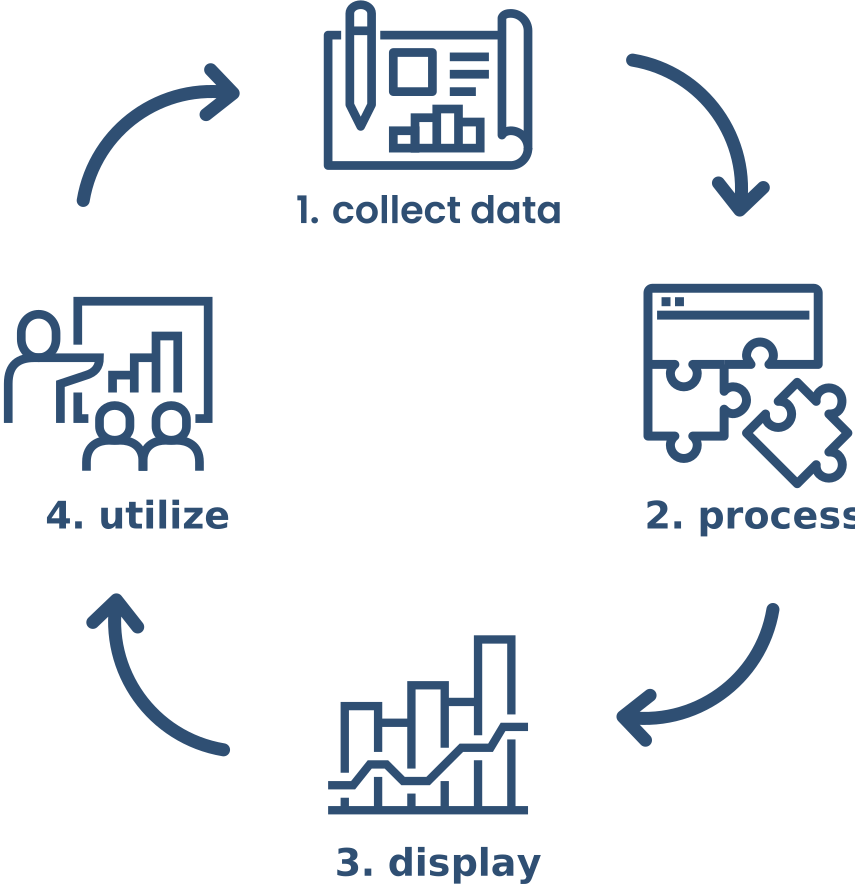
BI usually—and ideally—runs as a continuous BI cycle. Once established, the process produces valuable insights continuously and improves decision quality over time.
Mapping these steps internally without supporting software takes significant effort. Modern BI solutions can take over many of these steps.
-
Collecting data
Internal systems (e.g., databases, ERP, CRM, Excel) and external systems (e.g., website analytics, social media, market research) provide a wide variety of data. Depending on the goals, these sources should be integrated by priority.
-
Data integration and preparation
This includes cleaning and transforming data, as well as storing it and making it accessible in a central place. One option is an internal data warehouse as the central database. For many companies, a BI solution (or a connected cloud setup) can handle this instead—without having to run their own infrastructure.
-
Visualization and analysis
Analysis software helps explore and filter the required data and time ranges. Patterns and anomalies become visible quickly. This makes it possible to identify trends, optimization potential, or new market opportunities. These insights can directly inform recommendations for action.
This enables objective answers to questions like: What happened in the last quarter? Why did something happen? Which actions do we derive from the insights?
-
Delivery and use of insights
Interactive dashboards or reports provide, depending on needs, the flexibility or the overview to quickly grasp the most important information. This can be used directly by teams as decision-making foundations and/or for reporting to leaders and decision-makers.
The resulting insights are translated into actions—for example, adjusting a marketing campaign based on new conversion insights or optimizing inventory after analyzing lead times.
The outcomes of these actions flow back into the BI process as feedback.
In the BI cycle, data is collected, analyzed, and used again and again—so decisions and the business improve continuously.
Who can and should use Business Intelligence?
In the past, static reports were produced periodically and with significant manual effort. Today there are simple, fast, dynamic, and interactive solutions. While some BI applications are complex to set up and use, others enable self-service BI.
Self-service BI means that setting up and using a BI solution does not require prior knowledge or expertise. Easy connections, dashboard/report templates, and intuitive guidance make it possible to start the BI process in just a few clicks.
Business intelligence is no longer reserved for large corporations with many resources. It does not require dedicated BI specialists in the company: departments, management, small businesses, and freelancers can—and should—use BI alike.
Studies on successful BI adoption show:
What benefits arise from Business Intelligence?
By turning data into concrete value, BI can deliver significant benefits.
- Faster decisions with higher quality: up-to-date and reliable information is always available, reducing risks while maximizing opportunities.
- Optimized internal processes: automated reports and dashboards save time and resources across departments. Bottlenecks and inefficiencies become visible and can be addressed proactively.
- Better customer understanding: analyses of purchase patterns, customer feedback, and contextual KPIs provide strong optimization potential. Customers become more satisfied and relationships more profitable.
- Competitive advantage through fast response: trends, risks, opportunities, problems, and other market shifts become visible—so strategy can adapt quickly.
Of course, the concrete benefits always depend on correct implementation.
Defining clear goals (e.g., reduce costs in process X by Y%, increase customer satisfaction in area Z) and aligning the BI strategy accordingly can help.
The right start with Business Intelligence
Getting started with BI doesn’t have to be a huge project. Often it’s enough to start with one concrete use case and expand it step by step.
A typical BI introduction process looks like this:
-
Define goals and questions
Which problems should be solved—or which areas improved? For example: reduce costs in a process, increase revenue in a channel, or improve customer satisfaction.
-
Identify relevant data sources
Which systems contain the information to answer these questions? Typical sources include CRM, ERP, shop systems, accounting, support tools, or website analytics.
-
Choose a suitable BI solution
Depending on budget and resources, select a business intelligence or self-service BI solution that can connect to the most important systems with minimal effort.
-
Build the first dashboard or report
Start with a few central metrics and build an initial dashboard. It shows the most important KPIs at a glance and is used regularly by the relevant people.
-
Use regularly and evolve
Feedback from daily use flows back into the BI process. Metrics get refined, additional sources are added, and more dashboards are created as needed.
It is recommended to start small, gain initial insights quickly, and then expand the BI approach step by step. This way, the BI setup grows with you—instead of becoming too complex from the start.
Conclusion
Available data is growing and becoming increasingly important. Using it makes companies smarter and more capable of action.
Business intelligence is indispensable today so this data actively contributes to value creation.
Whether small start-up or large industrial enterprise: the right strategy to make data usable provides a decisive advantage and contributes significantly to sustainable success.
Successful companies already rely on BI:
If you haven’t dealt with business intelligence yet, you’re missing opportunities—start now.